Activate Trackting SMART V3
Activating Trackting SMART V3 really takes just a few minutes. Installation is simple and quick
Discover your SMART
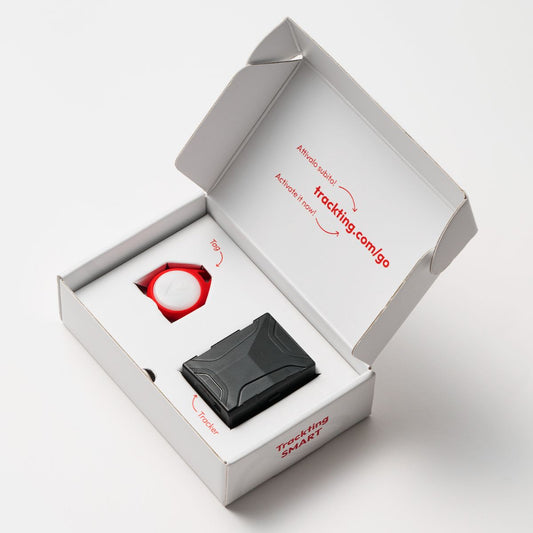
Inside the box, you will find:
- Black GPS Tracker
- Red keyring Tag with battery inside, already paired with the Tracker
- Card with QR Code
- USB-C charging cable
- Double-sided tape and cable ties for fastening
———
Good to know
Please note: this activation procedure refers to the new Trackting SMART V3 model.
If you purchased the previous model, you activate it from here.
-
01
Install the "TRACKTING" app
- For iPhone click here – App Store
- For Android click here – Google Play
Sign up and follow the instructions in the App.
-
02
Charge the tracker
Connect the Tracker (black device) to a charger using the supplied USB-C cable.
The Tracker's LED will start flashing red. Wait until it turns solid green: charging complete.
———
Good to know
The Tag (red key fob) in the box already has a battery inside and is already paired with your Tracker: you don't need to do anything.
-
03
Pair the tracker
Open the App, tap Add device (the + button at the top), allow the App to use the camera and frame the QR Code printed on the card you find inside the box.
-
04
Run the first location update
- Take the Tracker and Tag to an outdoor spot with a clear view of the sky.
- Shake the Tracker for 5 seconds, then place it on a flat surface.
- Now move at least 30 metres away with the Tag.
- Within 5 minutes, you'll receive a notification on the App where you can see the location on the map
Great! You've completed your first location fix!
Can't see the location on the map? Repeat the procedure or contact Customer Support.
-
05
Place the tracker on your vehicle
Hide the Tracker on your vehicle and remember to always carry the Tag with you.
A few useful tips:
- For optimal GPS signal reception, the Tracker's label must face downwards.
- NEVER leave the device connected to the charger: in this state the device will not trigger an alarm.
- Never hide it inside closed metal compartments that can shield the signal.
- In a car: avoid placing it in the doors, as they can vibrate and generate false alarms.
- On a motorcycle or scooter: if you place it in the under-seat compartment, you must secure it with the supplied double-sided tape to avoid vibrations.
- From the App you can adjust the vibration sensitivity for the Tracker's accelerometer
NOTES:
The Tracker can be secured using the automotive double-sided tape provided in the box.
- For optimal adhesion, install the device on clean, dry surfaces that are not exposed to direct heat.
- We recommend that you do not install the device in areas subject to high temperatures, such as near exhaust pipes, engines or parts that generate intense heat. Prolonged high temperatures can in fact reduce the effectiveness of the double-sided tape over time.
- periodically check the condition of the adhesive and, if necessary, replace it with an equivalent tape.
-
06
Get to know it to get the most out of it!
Trackting Smart is a complete and intelligent system: to fully understand it and get the most out of it, we recommend reading this simple guide.
New! You can adjust the vibration sensitivity
Adjust the sensitivity based on your vehicle type and your needs.
Remember: too high a sensitivity could trigger the alarm in case of external vibrations (such as a passing truck).
Choose the right coverage for you
Three versions based on SIM coverage. No subscription, forever.
-
Trackting SMART V3 Italy
Vendor:Senza canone per sempreRegular price €199,00 EURSale price €199,00 EURUnit price / per -
Trackting SMART V3 Europe
Vendor:Senza canone per sempreRegular price €249,00 EURSale price €249,00 EURUnit price / per -
Trackting SMART V3 World
Vendor:Senza canone per sempreRegular price €349,00 EURSale price €349,00 EURUnit price / per